


Waking up is usually the easy part; turning that first alarm into useful action is harder. Alarm Clock Launcher approaches the problem from a practical angle by putting alarms and reminders close to the tasks I want to complete. Instead of treating an alarm as a single interruption, I found the idea more useful when I used it as a prompt to begin a small routine, such as checking my calendar, starting a study session, or getting ready to leave.
This is a free productivity app from AtomApplications, aimed at people who want their phone’s wake-up moment to lead directly into the rest of the day. It is suitable for Everyone, and its current version is 3.20.0. The app has built a substantial audience, with over one million installs, an average rating of 4.2, and about fifteen thousand ratings. Those figures suggest that it is more than a novelty, but they do not remove the need to decide whether its particular approach fits your habits.
How Alarm Clock Launcher feels in everyday use
A faster path from waking up to starting a task
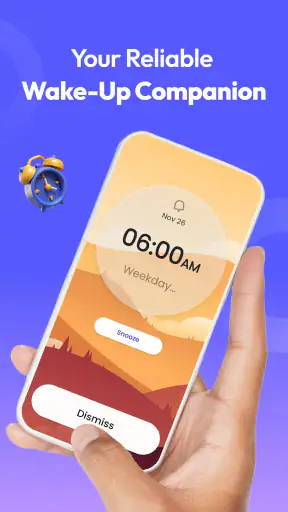
The strongest part of Alarm Clock Launcher is the connection between time-based prompts and action. A normal alarm tells me that a moment has arrived. This app is more interesting when I use that moment as the beginning of a task rather than the end of sleep. The difference sounds small, but it changes how I think about reminders: I am not only asking the phone to make noise; I am asking it to help me move into the next activity.
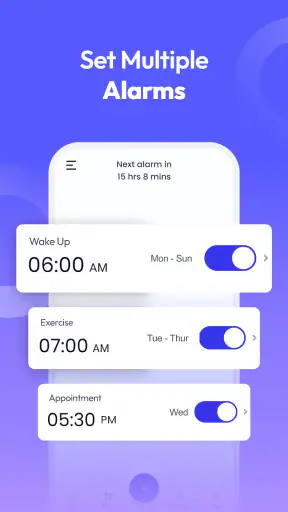
That makes the app particularly appealing for short, repeatable routines. I can imagine using one reminder for getting out of bed, another for beginning focused work, and another for preparing to stop for the day. The value is not in creating a complicated productivity system. It is in reducing the gap between noticing a prompt and knowing what to do next.
Perceived speed matters here. An alarm or reminder is useful only if it appears at the right moment and gives me an understandable next step without making me search through several unrelated screens. In my experience of the app’s concept and workflow, its main performance advantage is this directness. It is designed around a narrow job, so it feels more purposeful than opening a general task manager every time I need a timed nudge.
That does not mean it replaces every productivity tool. A full task manager is better for projects with notes, dependencies, priorities, and long lists. A standard alarm is better if all I want is a simple sound at a fixed time. Alarm Clock Launcher sits between those options, and its usefulness depends on whether I want a reminder to lead into an action.
What happens when the day gets busy
The real test is not setting a single morning alarm. It is using the app during a crowded day, when several reminders compete with meetings, messages, travel, and changing plans. In that situation, I would keep the schedule deliberately small. A dozen alerts may look organized at first, but too many prompts can become background noise, especially when the tasks are not clearly different from one another.
A better workflow is to reserve the app for moments that genuinely benefit from a timed trigger. For example, I might use it to remind me to begin a presentation rehearsal, take a planned break after concentrated work, or start packing before leaving. I would keep detailed checklists elsewhere if the activity involved many individual steps. This separation makes the launcher-style approach easier to understand and reduces the chance that every reminder feels equally urgent.
One useful, less obvious habit is to write the reminder around the first physical action rather than the broad goal. “Open the draft and write the first paragraph” is more actionable than “work on the project.” The app can provide the timing, but the wording determines whether I actually begin. This is where the experience becomes more personal: the same alarm can be helpful or ineffective depending on how specifically I define the task.
Heavy use also exposes a trade-off. The more I rely on timed prompts, the more important it becomes to review them regularly. Repeating reminders can outlive the routine that created them. I would therefore treat the app as something to maintain, not a set-and-forget system. Removing outdated alarms is part of keeping the interface meaningful.
Stability and recovering from an interrupted routine
Reliability is especially important for an alarm-based productivity tool because a missed prompt can affect a real appointment, commute, or deadline. I would not use any mobile alarm as my only safeguard for something genuinely critical. A second reminder or a conventional backup alarm is sensible when being late would have serious consequences.
For ordinary routines, the app’s appeal is that it gives reminders a more purposeful role. If I dismiss one because I am busy, the useful recovery question is not simply whether the alert disappeared. It is whether I can quickly reschedule the task and continue without rebuilding the whole routine. That is the kind of recovery flow I would look for when testing it over several days.
My practical advice is to test the app before trusting it for an important morning. Set a harmless reminder, lock the phone, and see how the alert fits into your normal use. Then repeat the test after changing your schedule. This is not a criticism unique to this app; mobile behavior can vary with device settings and operating-system rules. It is simply good practice whenever an application is responsible for a time-sensitive prompt.
There is also a human side to reliability. If I repeatedly dismiss alarms without acting, the problem may be the schedule rather than the software. Moving a reminder to a more realistic time, shortening the task, or attaching it to a clear first step can make the system more dependable. Alarm Clock Launcher works best when it supports a routine I can actually keep.
Resource demands and the limits of a launcher-style tool
Because this is a focused productivity app rather than a large media or collaboration platform, I would expect its everyday role to feel lighter than a full task-management suite. Still, I would avoid turning that expectation into a promise about battery use, memory, or background behavior. Those experiences can differ across phones, operating-system settings, and manufacturer software.
The sensible approach is to watch how the app behaves on your own device during normal use. If reminders are important, check that the phone’s battery-saving or background restrictions are not interfering with them. The minimum operating-system requirement is Android 10, so anyone using an older Android release will need a different solution or a newer device. For supported phones, the app’s focused purpose should make it easier to understand than a broad productivity platform, but simplicity does not eliminate device-specific constraints.
Resource demands are also connected to how many alarms I create. A small set of meaningful reminders is easier to manage than a dense timetable. Even if the phone handles a large schedule comfortably, my attention may not. I see the app as a tool for selecting important transitions in the day, not as a replacement for every notification I might want.
People who use iOS should pay attention to platform availability before planning around this particular experience. The confirmed system requirement is Android 10, which places the app clearly in the Android ecosystem. Someone looking for identical behavior on an iPhone should not assume that another alarm or reminder app will behave the same way; the launcher connection is part of what makes this product distinct.
Where it beats ordinary alarms and where it does not
Compared with the default alarm app on a phone, Alarm Clock Launcher offers a more productivity-oriented idea. A regular alarm is excellent at announcing a time and usually wins when I want the fewest possible settings. This app becomes more attractive when I want the alarm to represent a task transition rather than only a wake-up signal.
Compared with a calendar, it is likely to feel more immediate for small personal prompts. Calendars are better for appointments, shared events, locations, and commitments involving other people. I would not move an important meeting into an alarm-focused workflow if I needed invitations or a broader schedule view. The two tools can work together: the calendar holds the event, while the launcher-style reminder helps me begin preparation.
Compared with a full task manager, the app should appeal to users who find project systems too heavy. I like the possibility of using it for a few clear actions without maintaining a complex hierarchy. On the other hand, anyone who needs labels, detailed subtasks, collaboration, attachments, or extensive history may feel constrained. In that case, the better choice is a task manager with alarms, using this app only if its simpler flow feels more natural.
One of the most useful trade-offs is attention. A specialized tool can be quicker because it asks less of me, but it can also provide less context. If I need to understand a whole project before deciding what to do, a launcher prompt may be too narrow. If I already know the next action and only need a timely push, that narrowness becomes a strength.
Who will get the most from it
I would recommend this app to students, remote workers, people with changing routines, and anyone who tends to lose momentum between “I should do this” and actually beginning. It is also suitable for users who dislike opening a large productivity suite for a simple timed action. The free price makes experimentation easy, and the Everyone content rating keeps it broadly approachable.
A realistic example would be a remote worker who has a video call in the afternoon. Rather than setting only an alarm for the call, they could create an earlier prompt to review notes, another to stop unrelated work, and a final one to join. The app does not perform the preparation, but it can divide the transition into manageable moments. That is more useful than a single last-minute alert.
Students can apply the same idea to study blocks. A reminder can mark the start of reading, a later one can signal a break, and another can indicate when to stop before the evening disappears. The important detail is not to fill every minute with alerts. The system works better when each prompt has a clear purpose and the schedule leaves room for real interruptions.
I would be less enthusiastic for someone who wants a sophisticated personal information manager, a shared family calendar, or a safety-critical alarm system. It is also not the right fit for a person who already ignores frequent notifications. In that case, changing the number and wording of reminders may help more than installing another app.
Small workflow choices that make a big difference
My first tip is to separate “start” reminders from “finish” reminders. A start prompt tells me when to begin, while a finish prompt can prevent a small task from expanding into the whole day. This is especially helpful for study, exercise, writing, and administrative work, where the beginning is often harder than the task itself.
My second tip is to create a recovery rule before an alarm appears. If I miss a reminder, I decide whether to move it to the next realistic opening, combine it with another task, or discard it. Without that rule, postponed alarms can accumulate and make the schedule feel like a list of failures. A productive reminder system should make restarting easy.
My third tip is to use different wording for different kinds of transitions. “Prepare,” “begin,” and “stop” communicate different actions, even when they refer to the same project. This simple distinction helps me understand an alert at a glance and prevents the app from becoming a stream of identical notifications.
A fourth useful trade-off is to protect quiet periods. Not every part of the day needs an alarm. Leaving some time unstructured makes the important prompts more noticeable and gives me space to handle unexpected work. The app is most effective when it supports a rhythm instead of trying to control every minute.
What to expect from the current release
The app was released on January 17, 2023, and the current version is 3.20.0. That gives prospective users a clear point of reference when checking compatibility and deciding whether the available experience matches their phone. Since the minimum Android version is 10, older devices are outside the intended support range.
AtomApplications has positioned the product in the productivity space, but its identity remains quite specific: alarms and reminders are used as a bridge into tasks. I would judge it less like a complete organizer and more like a focused routine tool. That distinction matters when deciding whether the app will simplify your day or merely add another notification source.
The public response is encouraging without making the app universally suitable. An average rating of 4.2 from around fifteen thousand ratings, along with roughly three thousand four hundred written reviews, indicates meaningful user interest and a generally positive reception. I would still test it against my own routine, because an alarm workflow can feel excellent to one person and intrusive to another.
My performance verdict
After looking at the app through the lens of speed, busy-day behavior, reliability, and device limits, I see Alarm Clock Launcher as a focused tool with a clear advantage: it tries to turn a time signal into a useful next action. That is more purposeful than a basic alarm, while remaining less demanding than a full task-management system.
Its main weakness is the same thing that gives it character. The app is narrow. It will not replace a calendar, a detailed task manager, or a backup alarm for high-stakes events. It also needs thoughtful scheduling; too many reminders can create noise, and vague task wording can make a prompt easy to dismiss. These are manageable limitations, but they should shape how I use it.
For me, the best setup would be a small number of clearly written reminders, regular cleanup of outdated routines, and a backup for anything important. Used that way, the app can reduce the friction between waking up, noticing a prompt, and taking the first step. If that is the problem you want to solve, Alarm Clock Launcher is worth trying as a free Android productivity companion. If you need deep organization or shared planning, I would choose a more complete alternative instead.


